Thursday, July 25, 2019

Low Orbit Ion Cannon


“Hacktivist” group Anonymous’s original tool of choice – LowOrbit Ion Cannon (LOIC) 


Operating system: Windows, Linux, OS X, Android, iOS
Stable release: 1.0.8 / 13 Dec 2014;
Size: 131 KB
Original author(s): Praetox Technologies
Platforms: .NET Framework, Mono
Written in: C#, C++

Download  is a simple flooding tool, able to generate
massive amounts of TCP, UDP, or HTTP traffic in order to subject a
server to a heavy network load. While LOIC’s original developers,
Praetox Technologies, intended the tool to be used by developers who
wanted to subject their own servers to such a heavy network traffic
load for testing purposes, Anonymous picked up the open-source tool
and began using it to launch coordinated DDoS attacks.
Soon afterwards, LOIC was modified and given its “Hivemind”
feature, allowing any LOIC user to point his or her copy of LOIC
at an IRC server, transferring control of it to a master user who
38can then send commands over IRC to every connected LOIC client
simultaneously. In this configuration, users are able to launch much
more effective DDoS attacks than those of a group of less-coordinated
LOIC users not operating simultaneously. In late 2011, however,
Anonymous began to step away from LOIC as their DDoS tool of
choice, as LOIC makes no effort to obscure its users’ IP addresses.
This lack of anonymity resulted in the arrest of various users
around the world for participating in LOIC attacks, and Anonymous
broadcasting a clear message across all of its IRC channels: “Do NOT
use LOIC.”

DDoS Attack Mitigation Understanding DoS and DDoS Attacks

What is a DoS attack? What is a DDoS attack? What’s the
difference? How are they created? What are their strengths and
weaknesses? Before discussing any survival techniques, you must
first understand from what you are trying to survive.
To provide a figurative example of a DoS attack, imagine yourself
walking into a bank that only has a single teller window open. Just as
you are about to approach the teller, another person rushes into the
bank and cuts in front of you. This person begins making small talk
with the teller, and has no intention of performing any bank-related
transactions. As a legitimate user of the bank, you are left unable
to deposit your check, and are forced to wait until the “malicious”
user has finished his or her conversation. Just as this malicious user
leaves, another person rushes into the bank, again cutting to the front
of the line ahead of you and forcing you to keep waiting. This process
can continue for minutes, hours, even days, preventing you or any of
the other legitimate users who lined up behind you from performing
bank transactions.

During DoS attacks, attackers bombard their target with a massive
amount of requests or data – exhausting its network or computing
resources and preventing legitimate users from having access. More
simply, a DoS attack is when an attacker uses a single machine’s
resources to exhaust those of another machine, in order to prevent
it from functioning normally. Large web servers are robust enough to
withstand a basic DoS attack from a single machine without suffering
performance loss (imagine if the bank in the above example had many
teller windows open for you to use to avoid waiting for the busy one).
However, attackers will often carry out DDoS attacks, which employ
multiple machines for increased effectiveness, in effect, by trying to
tie up all of the tellers at all of the open windows. In that scenario, it
can often be harder to detect and block attackers manually, so special
defenses are necessary to detect and defend against such large-scale
attacks. Additionally, attackers almost never legitimately control
their attacking machines; rather, they infect thousands of computers
spread across the world with specialized malware in order to gain
6unauthorized access to such machines. A collection of hundreds or
thousands of compromised machines acting as an army under the
control of one attacker is called a “botnet”, and oftentimes the actual
owners of machines that are part of a botnet are unaware that their
computers have been compromised and are being used to launch
DDoS attacks.


Amassing a Botnet

In order for attackers to create large botnets of computers under
their control (referred to colloquially as zombies), they have two
options: the more common option of using specialized malware to
infect the machines of users who are unaware that their machines
are compromised, or the relatively newer option of amassing a large
number of volunteers willing to use DoS programs in unison.
In the former scenario (by far the most common), attackers will
develop or purchase from various underground cyber crime forums
specialized malware, which they spread to as many vulnerable
computers as possible. Any users tricked into running such malware
will often disable antivirus functionality on their computer, and install
a “backdoor”, or access point, for attackers. Infected computers
begin accepting communications from “command and control” (C&C)
servers, centralized machines that are able to send commands to
botnet machines, usually by means of Internet Relay Chat (IRC), a
communication protocol designed for chat rooms. Anytime attackers
want to launch a DDoS attack, they can send messages to their
botnet’s C&C servers with instructions to perform an attack on a
particular target, and any infected machines communicating with the
contacted C&C server will comply by launching a coordinated attack.
When law enforcement officials attempt to dismantle a botnet, it
is often necessary to locate and disable C&C servers, as doing so
prevents most botnets from remaining operational. One particular
botnet that was dismantled in 2010, called “Mariposa” (Spanish
for “butterfly”), was found to contain nearly 15.5 million unique IP
addresses around the world with many associated command and
control servers. 2 More recent and advanced botnet software such as
TDL-4, however, has implemented special inter-bot communication
abilities over public peer-to-peer networks to help circumvent efforts to
dismantle botnets solely through the disabling of C&C servers.


In the case in which many computers are voluntarily acting in
unison, hackers sponsoring an attack will publish its details via a
social networking site or an IRC channel, including a date and time,
a target IP or URL, and instructions on which of the available attack
tools to use. Some attack campaigns following this model have
succeeded in recruiting many supporters. The main drawback for such
voluntary, coordinated DDoS attacks, however, is that the majority
of the attack tools used does not mask their users’ identities. One
such tool, Low Orbit Ion Cannon (LOIC), was notorious for this – many
LOIC users failing to use external means to hide their IP address
have been located and arrested by the FBI and other law enforcement
organizations around the world for participating in coordinated
voluntary attacks. News of these recent arrests may deter some new
users from opting to participate in such voluntary, coordinated attacks.


Launching an Attack

With the exception of amassing a botnet, launching a DDoS attack
is not a particularly difficult task to carry out, even for a non-technical
individual. Users do not need to create their own botnets in order
to launch large-scale attacks, as various dedicated pay-for-hire DDoS
services are available for anyone to use. Anyone using such a service
can launch a powerful DDoS attack on a target of their choice for
anywhere from $5 to $200 per hour, depending on the attack size and
duration.
8Business Impact
Various surveys on DDoS attacks have highlighted interesting
facts on the impact of DDoS on targeted companies. According to
a Neustar survey, 70% of the surveyed companies were victims of a
DDoS attack that caused some level of damage. 3 While DDoS attacks
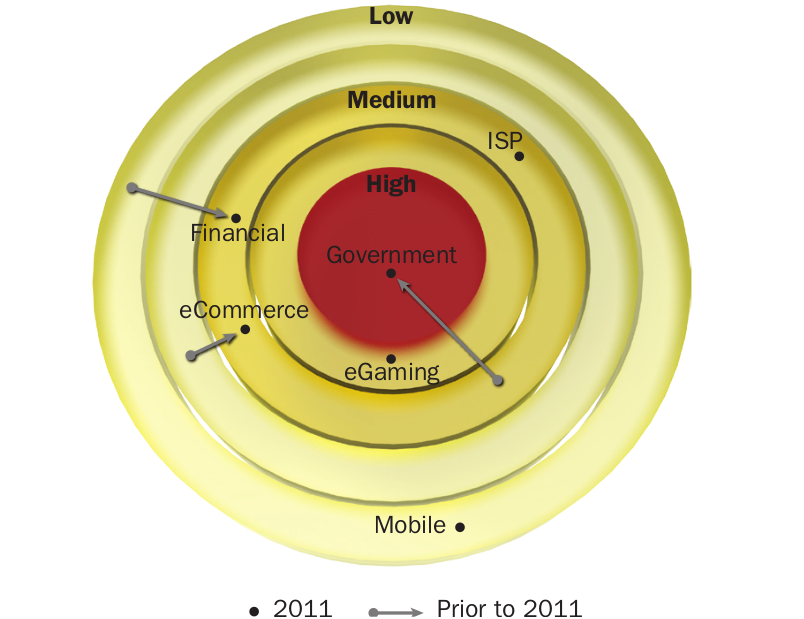
may have had more industry-specific targets in the past, such attacks
target all sectors today – financial services, governments, online
retailers, and online gaming, among others. The following diagram
taken from Radware’s 2011 Global Application and Network Security

Report 4 illustrates this trend.


The business impact of a DDoS attack is substantial, and can affect
a victim over a period of time depending on the extent of the attack.
According to both the Neustar and Radware reports, the DDoS attacks
perpetrated in 2011 lasted anywhere from several hours to several
days, with an average duration of about 24 hours. The effects from
a DDoS attack can vary depending on the sector a target company
belongs to and the volume of its online business. Often, these effects
are both qualitative and quantitative, and can involve financial losses,
reputational damage, and legal repercussions.

Financial Losses

The cost to an organization when its Website experiences downtime
varies significantly depending upon the sector to which that particular
3 Neustar Insight – DDoS Survey Q1 2012
4 2011 Global Application and Network Security Report
9organization belongs. The Neustar survey found that organizations
depending mainly or exclusively on the Internet for their business
(notably online retail or gaming sites) estimated an average daily
revenue loss of $2,000,000 – nearly $100,000 per hour – in the case
of downtime, while other sectors, such as financial services, report a
smaller yet significant average loss of $10,000 per hour in the event
of downtime.

This calculation takes into account a few different elements: the
cost of the attack itself, revenue loss from customers’ and potential
customers’ inability to access the Website, time spent answering
customer support calls, and possible additional financial penalties.
Most serious attackers carefully plan their attacks, striking during
critical periods for their target Website, for example during the holiday
shopping season for an online retailer.

The wave of DDoS attacks that targeted major Websites such as
Yahoo and Amazon in 2000 was estimated cumulatively to have
cost over $1.2 billion in damages. 5 The total cost of the more
recent attacks on Sony’s Websites remains unclear and is difficult to
estimate. Over $170M has been spent by Sony for cleanup related
to the DDoS attack and loss of data, but some analysts estimate an
ultimate cost of hundreds of dollars to Sony per each one of the 77
million compromised user accounts – amounting to billions of dollars
in damages. 6 Regardless of analyst estimates, one thing is clear:
the cost incurred by an organization that is not adequately protected
against DDoS attacks can be exorbitantly high.

Customer Attrition

The most significant business impact outlined by surveyed companies
is that related to its customers. A customer who attempts to access
an organization’s Website but is unable to do so because of downtime
cannot buy anything, access information, or generally use any services.
If he or she is unsatisfied, complains, requests for financial restitution,
or even increased business for competitors may result.

According to the American Express 2011 Global Customer Service
Barometer, consumers spend more money wherever they have a

Google engineers have discovered t the average online customer
is not willing to wait an extra 400 milliseconds for a page to load
– “literally the blink of an eye” as per a New York Times article8.
Online customers require quick access to information, and according
to Microsoft, would visit a Website less often if it is slower than that
of its competitors by more than 250 milliseconds. 8 Consequently,
a DDoS attack that prevents the targeted company’s Website from
providing adequate service to its users can result in customer
dissatisfaction, angry support calls, and even customer attrition.
Reputation Loss

Businesses want to make headlines by showing off merits and
achievements. Management teams dislike being forced to admit
vulnerabilities in the media. When it becomes publicly known that a
company has been a victim of a cyber attack that has compromised
its customers and their data, the ensuing bad publicity can have
devastating effects on both reputation and future sales. Any company
falling prey to hackers becomes an example of “what not to do”, and
the ensuing fallout often involves replacing the IT team that allowed
the disruption or break, corporate rebranding, and expensive public
relations to regain the trust of the public.
Legal Pursuits

Customers affected by the unavailability of online services who can
prove that they suffered damages may attempt to pursue financial
restitution by means of filing a lawsuit, often arguing that the company
did not take enough precaution against the possibility of such an
attack. In one example, a major stock exchange, hit by a DDoS attack
in 2011, was forced to suspend trading and pay penalties to trading
firms to compensate for their inability to provide normal service.

Conclusion

The ability of an organization to protect itself against DoS and
DDoS attacks is essential for its success. Without proper protection
mechanisms, an organization targeted by a DoS or DDoS attack is
likely to experience financial loss, reputational damage, and legal

expense – all of which are likely to permanently affect its future.

What is Rooting or Jailbraking ?


When you talk about the iPhone, the term “jail-breaking” often comes up.
Similarly, when it’s Android – or just about anything on a Linux/Unix
architecture – the term thrown around is Rooting (akin to root access, i.e.
superuser). Think about it as obtaining administrator access to your own
system, with the power to change apps, how they’ll run, replacing the ones
you don’t like and just moving past any restrictions that would be placed
upon the user by the manufacturer.

So exactly what can you do with root access? Well, you can install custom
themes, fool around with the performance for some added boosts, lower
battery usage, install new features such as tethering and load custom ROMs
(detailed below). Its the epitome of true control – and given the amount of
customization built into Android, the number of changes you can make
is, lets just say that its a very large number. Read our Android coverage
ahead to know more.

Take CyanogenMod for instance, which is meant to be a replacement
firmware based on the Android architecture. Even though it’s more in line
with a custom ROM, it allows app management permissions, and the ability
to over-clock one’s CPU besides adding additional features such as WiFi
support, tethering, FLAC support and more.


aren’t exactly okay with jail-breaking and rooting, it’s no longer considered
illegal. In fact, companies like Samsung and HTC are showing such sup-
port to third party developers like CyanogenMod that they intend to bring
the superior firmware to their devices. Probably the best new feature of
CyanogenMod is that it’s no longer rooted - you can simply install it and
enable it as a feature. It also gives you several options for rooting and you
can choose to disable it altogether. What does this mean? As repetitive as
it sounds, the detailed coverage is still ahead.

It should be noted that rooting carries its own risks, depending on what
you’re doing. System updates provided by Google may not work when
applied. There’s also chance of bricking or boot looping if done incorrectly.

How to Dangerous Search Google – Searching for Secrets

Information which should be  protected is very often publicly available, revealed by careless or ignorant users. The result isthat lots of confidential data is freely available on the Internet
– just Google for it.


  • how to use Google to find sources of personal information and other confidential data,


  • how to find information about vulnerable sys-tems and Web services,


  • how to locate publicly available network de-vices using Google.

Google serves some 80 percent of all search queries on the Internet, mak-ing it by far the most popular search engine. Its popularity is due not only to excel-lent search effectiveness, but also extensive querying capabilities. However, we should also remember that the Internet is a highly dynamic medium, so the results presented by Google are not always up-to-date – some  search results might be stale, while other relevant resources might not yet have been visited by Googlebot (the automatic script that browses and indexes Web resources for Google). Table 1 presents a summary of the most important and most useful query operators along with their descriptions, while Figure 1 shows document locations referred to by the  operators when applied to Web searches. Of course, this is just a handful of examples – skil- ful Google querying can lead to much more interesting results.

Hunting for Prey


Google makes it possible to reach not just
publicly available Internet resources, but also
some that should never have been revealed.


Google Search Operators

What are Google search operators?

Google search operators are special characters and commands (sometimes called “advanced operators”) that extend the capabilities of regular text searches. Search operators can be useful for everything from content research to technical SEO audits.

How do I use search operators?

You can enter search operators directly into the Google search box, just as you would a text search:


Except in special cases (such as the “in” operator), Google will return standard organic results.

Google search operators cheat sheet

You can find all of the major organic search operators below, broken up into three categories: “Basic”, “Advanced”, and “Unreliable”. Basic search operators are operators that modify standard text searches.
I. Basic Search Operators
" ""nikola tesla"
Put any phrase in quotes to force Google to use exact-match. On single words, prevents synonyms.
ORtesla OR edison
Google search defaults to logical AND between terms. Specify "OR" for a logical OR (ALL-CAPS).
|tesla | edison
The pipe (|) operator is identical to "OR". Useful if your Caps-lock is broken :)
( )(tesla OR edison) alternating current
Use parentheses to group operators and control the order in which they execute.
-tesla -motors
Put minus (-) in front of any term (including operators) to exclude that term from the results.
*tesla "rock * roll"
An asterisk (*) acts as a wild-card and will match on any word.
#..#tesla announcement 2015..2017
Use (..) with numbers on either side to match on any integer in that range of numbers.
$tesla deposit $1000
Search prices with the dollar sign ($). You can combine ($) and (.) for exact prices, like $19.99.
€9,99 lunch deals
Search prices with the Euro sign (€). Most other currency signs don't seem to be honored by Google. 
in250 kph in mph
Use "in" to convert between two equivalent units. This returns a special, Knowledge Card style result.
Advanced search operators are special commands that modify searches and may require additional parameters (such as a domain name). Advanced operators are typically used to narrow searches and drill deeper into results.
II. Advanced Search Operators
intitle:intitle:"tesla vs edison"
Search only in the page's title for a word or phrase. Use exact-match (quotes) for phrases.
allintitle:allintitle: tesla vs edison
Search the page title for every individual term following "allintitle:". Same as multiple intitle:'s.
inurl:tesla announcements inurl:2016
Look for a word or phrase (in quotes) in the document URL. Can combine with other terms.
allinurl:allinurl: amazon field-keywords nikon
Search the URL for every individual term following "allinurl:". Same as multiple inurl:'s.
intext:intext:"orbi vs eero vs google wifi"
Search for a word or phrase (in quotes), but only in the body/document text.
allintext:allintext: orbi eero google wifi
Search the body text for every individual term following "allintext:". Same as multiple intexts:'s.
filetype:"tesla announcements" filetype:pdf
Match only a specific file type. Some examples include PDF, DOC, XLS, PPT, and TXT.
related:related:nytimes.com
Return sites that are related to a target domain. Only works for larger domains.
AROUND(X)tesla AROUND(3) edison
Returns results where the two terms/phrases are within (X) words of each other.
Unreliable operators have either been found to produce inconsistent results or have been deprecated altogether. The "link:" operator was officially deprecated in early 2017. It appears that "inanchor:" operators are still in use, but return very narrow and sometimes unreliable results. Use link-based operators only for initial research.
III. Unreliable/Deprecated Operators
~~cars
Include synonyms. Seems to be unreliable, and synonym inclusion is default now.
++cars
Force exact-match on a single phrase. Deprecated with the launch of Google+.
daterange:tesla announcements daterange:2457663-2457754
Return results in the specified range. Can be inconsistent. Requires Julian dates.
link:link:nytimes.com
Find pages that link to the target domain. This operator was deprecated in early 2017.
inanchor:inanchor:"tesla announcements"
Find pages linked to with the specified anchor text/phrase. Data is heavily sampled.
allinanchor:allinanchor: tesla announcements
Find pages with all individual terms after "inanchor:" in the inbound anchor text.
Note that, for all of the "allin...:" operators, Google will try to apply the operator to every term following it. Combining "allin...:" operators with any other operators will almost never produce the desired results.

Search Operator Tips & Tricks

Having all of the pieces is only the first step in building a puzzle. The real power of search operators comes from combining them.

1. Chain together operator combos

You can chain together almost any combination of text searches, basic operators, and advanced operators:
"nikola tesla" intitle:"top 5..10 facts" -site:youtube.com inurl:2015
This search returns any pages that mention "Nikola Tesla" (exact-match), have the phrase "Top (X) facts" in the title, where X ranges from 5 to 10, are not on YouTube.com, and have "2015" somewhere in the URL.

2. Hunt down plagiarized content

Trying to find out if your content is unique or if someone is plagiarizing you? Use a unique phrase from your text, put it in quotes (exact-match) after an "intext:" operator, and exclude your own site with "-site:"...
intext:"they were frolicking in our entrails" -site:moz.com
Similarly, you can use "intitle:" with a long, exact-match phrase to find duplicate copies of your content.

3. Audit your HTTP->HTTPS transition

Switching a site from HTTP to HTTPS can be challenging. Double-check your progress by seeing how many of each type of page Google has indexed. Use the "site:" operator on your root domain and then exclude HTTPS pages with "-inurl:"...
site:moz.com -inurl:https
This will help you track down any stragglers or find pages that might not have been re-crawled by Google.


Wednesday, July 24, 2019

Beware Of FREE FaceApp Pro Scams!

Free FaceApp Pro Scam

Researchers from ESET have spotted numerous scams exploiting the fame of the popular app ‘FaceApp’. These scams allegedly claim to offer the premium ‘FaceApp Pro’ version of the app for FREE.
As already known, the legit FaceApp is predominantly a free photo-editing application. However, it also offers some premium filters labelled as ‘PRO’. To use these filters, the users have to switch their app subscription to the paid one. Known as ‘FaceApp PRO’, it isn’t a separate app, rather a mere premium subscription to an otherwise free app.

Source: WeLiveSecurity

However, the scams tend to lure users by offering the PRO version of this app for FREE. The researchers noticed that the site required the users to go through various offers to install the app. As stated in their blog post,
The scammers trick their victims into clicking through countless offers for installing other paid apps and subscriptions, ads, surveys, and so on.
The fraud then continues as the user is barraged with lots of notifications for various fraudulent offers. Whereas, the entire effort ultimately led users to download the same free version of FaceApp already available. However, the app they actually downloaded came from a third-party website instead of Google Play Store. This makes users massively vulnerable to downloading fake malicious apps.
Instead of using Google Play as the source, the app was downloaded from a popular file-sharing service (mediafire.com). This means users could easily end up downloading malware if that was the attackers’ intention.
The scam is not only limited to websites but also YouTube. The researchers could see various videos promoting fake links to download free FaceApp PRO.

Source: WeLiveSecurity

Never Believe On FREE Premium App Versions

Since many users of free apps don’t purchase premium versions, they often get scammed whenever they see someone offering a premium copy for free. The ‘free FaceApp PRO’ scams are just another example of how the scammers love to exploit the curiosity and passion of users. While it is always difficult to control such scams, users can easily protect themselves by staying vigilant. As for ‘FaceApp PRO’, no such app exists with this name. FaceApp PRO is simply a premium subscription of the same app that you use. You only unlock a few more filters with a paid subscription. You can never actually download the entire premium version as a separate app unless it is a scam!
Stay safe!